


Planner + budget bundle · PDF + XLSX
ADHD Planner + Budget Spreadsheet Bundle (Light)
ADHD Planner + Budget Spreadsheet Bundle (Light)
One-time purchase · Instant download
Works with GoodNotes · Google Sheets · Notability · Excel 2016 or newer on Windows
Phone & tablet: add entries in the free Google Sheets app. Set it up on a computer first.
Look
- Dark: ADHD Planner + Budget Spreadsheet Bundle (Dark Mode)
- Light (this page)
Couldn't load pickup availability
Not sure yet? Try a free week first →
Digital file — nothing will be shipped. Your download link appears right after checkout and in your email.
- Undated planner
- Budget spreadsheet
- Tablet + computer
- 5 files
What's in the bundle
Bought separately in our shop: $32.28 · Bundle: $25.49 (save $6.79, 21%)
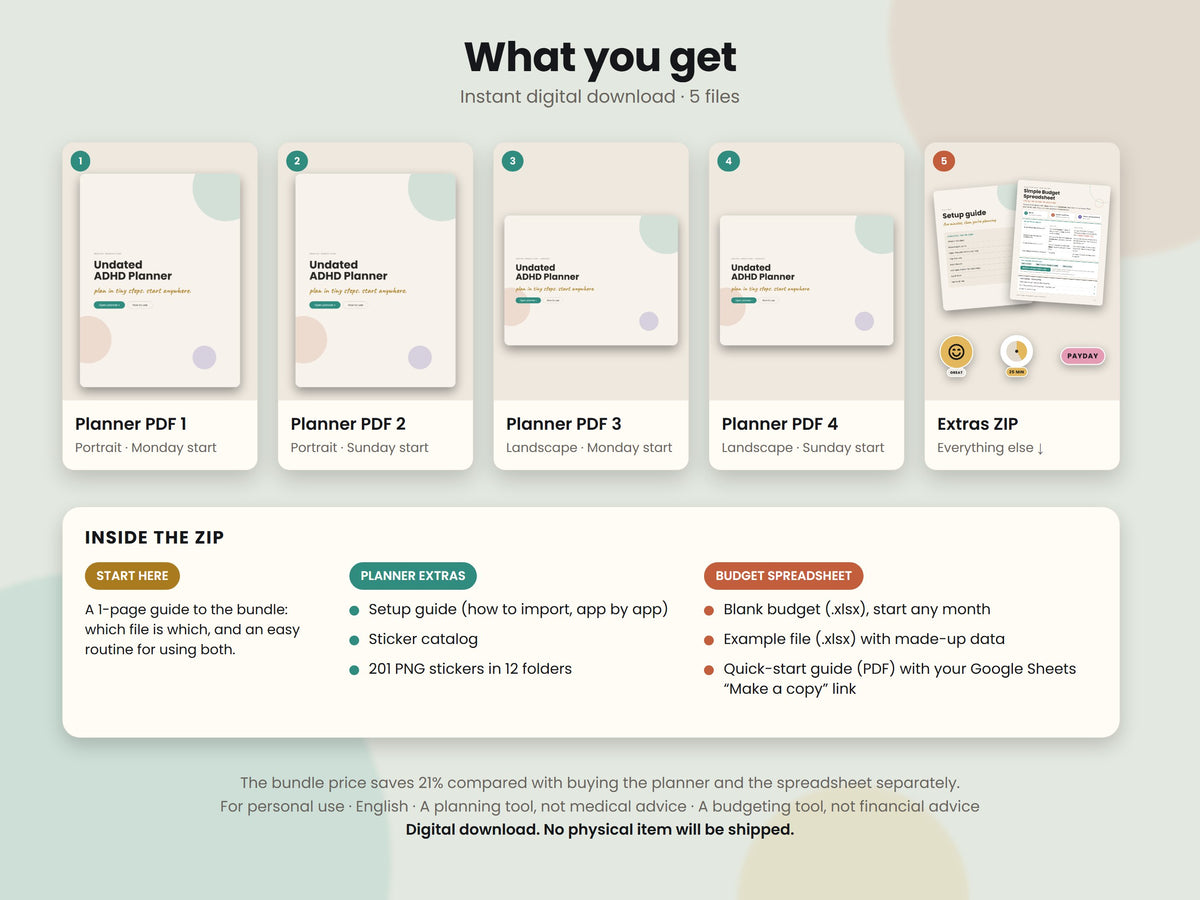
What you get
What you get
- Planner PDF, portrait, Monday start (577 pages)
- Planner PDF, portrait, Sunday start (577 pages)
- Planner PDF, landscape, Monday start (577 pages)
- Planner PDF, landscape, Sunday start (577 pages)
- ZIP file with everything else:
- – a 1-page "Start here" PDF that explains the bundle and an easy routine for using both tools
- – the planner setup guide PDF, the sticker catalog PDF and 201 PNG stickers (transparent backgrounds)
- – Simple-Budget-Spreadsheet.xlsx (your blank budget) and Simple-Budget-Spreadsheet-EXAMPLE.xlsx (the same file with made-up sample data)
- – the 4-page budget quick-start guide PDF with your Google Sheets "Make a copy" link
Works with
Works with
Note app
- GoodNotes
- Notability
- Noteshelf
- Noteful
Spreadsheet
- Google Sheets — Free Google account needed
- Excel 2016 or newer on Windows — Tested in Excel 2021
Computer
- Mac — Use the Google Sheets copy
Not tested yet
- Samsung Notes
- Xodo
Using one of these? Email us before you buy and we'll tell you honestly.
Not for
- Setting up the spreadsheet on a phone
- Apple Numbers
Instant download — how it works
Instant download — how it works
Check out. Your download button appears on the next page and in your email.
Unzip the ZIP and open "0 START HERE - Planner and Budget Bundle.pdf".
Import the planner into your note app. Make your Google Sheets copy from the budget guide, or open the .xlsx in Excel.
Full details
Full details
Plan your days. Track your money. Calm, light pages for both.
This bundle puts two of our tools together: the Undated ADHD Digital Planner on warm cream pages for your tablet, and the Simple Budget Spreadsheet for your computer. The planner helps you decide what to do today. The spreadsheet shows where your money went and what is safe to spend. They are separate files that you use side by side.
You save 21% compared with buying the planner and the spreadsheet separately in our store.
WHAT YOU GET · 5 FILES
- Planner PDF, portrait, Monday start (577 pages)
- Planner PDF, portrait, Sunday start (577 pages)
- Planner PDF, landscape, Monday start (577 pages)
- Planner PDF, landscape, Sunday start (577 pages)
- ZIP file with everything else:
– a 1-page "Start here" PDF that explains the bundle and an easy routine for using both tools
– the planner setup guide PDF, the sticker catalog PDF and 201 PNG stickers (transparent backgrounds)
– Simple-Budget-Spreadsheet.xlsx (your blank budget) and Simple-Budget-Spreadsheet-EXAMPLE.xlsx (the same file with made-up sample data)
– the 4-page budget quick-start guide PDF with your Google Sheets "Make a copy" link
HOW THE TWO WORK TOGETHER
- Every day: write your top 3 on the daily page. Log each money move in the spreadsheet's Transactions tab, about 30 seconds.
- Every week: plan the week's top 3, then open the Dashboard to see which bills are paid and what is safe to spend.
- Every month: fill in the planner's month reset page and check budget vs spent on the Dashboard.
The planner and the spreadsheet don't sync with each other. The planner holds the plan; the spreadsheet does the math.
PART 1 · THE PLANNER · 577 LINKED PAGES
- Home dashboard with a button for every month and all 60 weeks
- Year at a glance and a big-picture goals page
- 12 monthly calendars (write in your own dates) with a focus box and must-dos
- 60 weekly pages: weekly top 3 and a box for each day
- 420 daily pages: top 3, "if I only do one thing", time blocks from 6 am to 10 pm, energy, mood and water trackers, a take-care checklist, brain dump, wins and a note to tomorrow-me
- Every month: habit tracker, budget page and a month reset
- 17 tools, including brain dump + sort, dopamine menu, routines, cleaning reset, meal plan, bills & subscriptions and goal breakdowns
- 25 note pages: lined, dotted and grid
- Side tabs on every page, month › week › day in two taps, « » buttons to flip from day to day
- Undated: start on any day of any year. Portrait or landscape, Monday or Sunday start: all 4 versions are included.
- 201 matching stickers: labels, icons, dates, moods, energy batteries, focus timers, washi tape, doodles and phrases
PART 2 · THE SPREADSHEET · 7 TABS
You type in two places: a short Setup once, then one Transactions log each time money comes in or goes out. Everything else fills itself.
- Dashboard: pick a month and see money in, money out, saved + debt paid and safe to spend, a "where the money went" chart, budget vs spent for each category, savings goals, debts and account balances
- Bills tick themselves off: use the bill's name as the payee, and the Dashboard shows Paid ✔ (or Due, then Overdue)
- Year: 12 months side by side, with totals, monthly averages and a chart
- Accounts: a quick check against your bank app
- Start any month, any currency symbol
- A light, cream design that matches the planner. Nothing is locked, no macros.
HOW IT WORKS
- After checkout, click the download button on your order confirmation page. The same download link is also in your order confirmation email.
- Unzip the ZIP file and open "0 START HERE - Planner and Budget Bundle.pdf".
- Planner: import the PDF you like into your note app. The planner setup guide shows how.
- Spreadsheet: make your Google Sheets copy with the link on page 1 of the budget guide, or open the blank .xlsx in Excel. Setup takes about 5 minutes.
COMPATIBILITY
Planner:
- Made for tablets (iPad or Android) with a note-taking app that supports PDF hyperlinks, such as GoodNotes, Notability, Noteshelf or Noteful
- Portrait pages are 8.1 × 10.8 in and landscape pages are 10.8 × 8.1 in. The planner also opens in any PDF reader on a computer.
- Made for screens: the links only work on screen.
Spreadsheet:
- Google Sheets: use the "Make a copy" link in the guide (a free Google account is needed)
- Excel 2016 or newer on Windows (tested in Excel 2021)
- On a Mac? Use the Google Sheets copy
- Set it up on a computer. On a phone or tablet, open your copy in the free Google Sheets app to add entries and check it on the go. Phone web browsers show a read-only view. Not for Apple Numbers.
GOOD TO KNOW
- Digital download. No physical item will be shipped.
- For personal use only. You may gift one copy to one person. Please don't share, resell or redistribute the files or the Google Sheets link beyond that.
- English only. Colors may look slightly different on different screens.
- ADHD-friendly by design: short steps and one place to type. The planner is a planning tool, not medical advice or treatment. The spreadsheet is a budgeting tool, not financial advice.
- Designed with the help of AI tools, then checked by hand.
- Questions? Email us at lysansan24@gmail.com and we'll help.
MORE FROM OUR SHOP
Only need one part? The Undated ADHD Digital Planner (minimalist, light pages) and the Simple Budget Spreadsheet are also sold on their own in our store. Prefer dark mode? See our dark-mode Planner + Budget Bundle. Want extra life admin pages instead of a spreadsheet? Our ADHD Digital Planner Bundles add the Life Admin Insert Pack and a printable planner.
Common questions
Is this a paper planner?
No. It's a PDF file you open in a note app on your tablet. Nothing is shipped.
Which apps does it work with?
Note apps that support PDF links, such as GoodNotes, Notability, Noteshelf and Noteful. We haven't tested Samsung Notes or Xodo yet — email us first.
Do the files sync with each other?
No. They are separate files you use side by side.
How do I get my files?
After checkout, tap the download button on the confirmation page or in your email. It opens a Google Drive folder with your files.
Questions? Email us.
View full details


You might also need
-
Undated ADHD Digital Planner (Minimalist Light)
GoodNotes · Notability
Regular price $16.99Regular price -
ADHD Life Admin Planner Inserts (Digital + Printable)
GoodNotes · Notability
Regular price $10.19Regular price -
ADHD Printable Planner (Letter, A4, A5, Half Letter)
PrintableAny printer · Print shop
Regular price $8.49Regular price -
Undated ADHD Planner Bundle (Minimalist Light)
Bundle · save 28%GoodNotes · Notability
Regular price $25.49Regular price


ADHD Planner + Budget Spreadsheet Bundle (Light)
$25.49